
Lately I bought an old pc to use as a server and needed a network card for it. I didn’t think it be such a hassle but because of multiple PCI specs finding a card wasn’t easy. Theres been alot of confusion about pci cards and what card to get for your computer – PCI cards come in alot of different types and versions. I’ve done a good amount of research on this (if there are any discrepancies, please let me know) and hopefully this post will help clear things up.
PCI
Standard PCI cards (sometimes called pci 1.0) have a 32 bit width slot, and operate at 33 MHz. Originally they started as 5 volt cards but 3.3 volt cards began to be made that use a different slot.
PCI 2.1 came a few years later that added the Universal PCI card spec that allowed cards to be used in both 3.3 and 5v slots, and upped the bus to 66 MHz. Also they created a pci 64 bit width slot for high end cards (gigabit networking,…). This meant that there could be one of 4 different slots in your computer: 5v 32bit, 3.3v 32bit, 3.3v 64bit, 5v 64bit (see graphic below). This meant you either had to buy an exact card for the slot or a universal card (which most manufactures began to build).
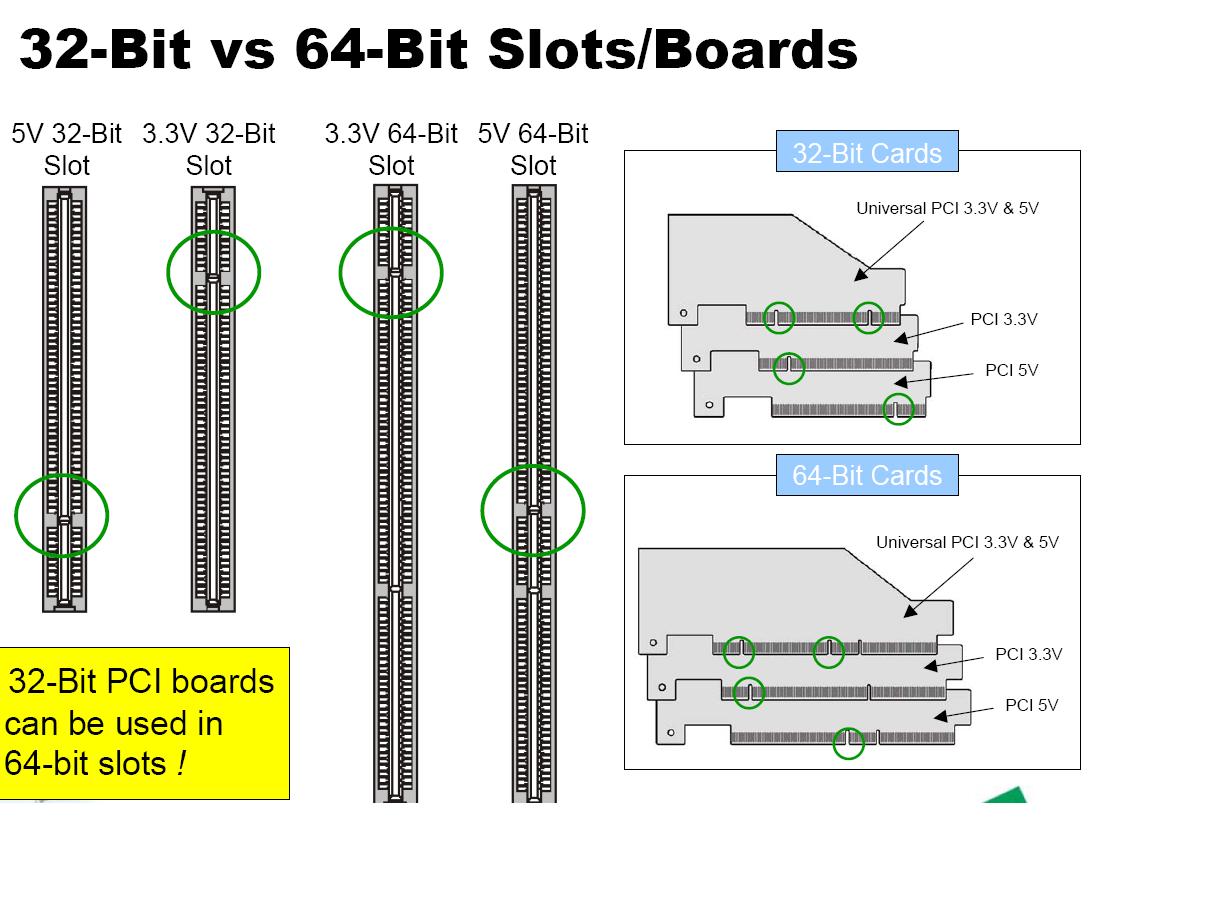
The PCI bus 2.3 spec came along and nix’d 5v adapters (cards). PCI 2.3 was adaptable though and supported 3.3v cards and universal pci cards.
PCI-X
PCI-X or PCI eXtended was built mainly for high end use. It has a bus speed of 66 or 133 MHz and only used the 64 bit 3.3v slot. It is fully backward compatible though with the existing PCI architecture: 33/66 MHz PCI adapters (cards) can be used in PCI-X slots and PCI-X adapters can be used in PCI slots. PCI-X 2.0 came along and really upped the bus speed to either 266 MHz or 533 MHz, but was still fully backwards compatible.
Which Card to Get?
Well really you can get any universal card and have it work. Carnildo helped me see things the easy way:
The rule of thumb for PCI and PCI-X cards is that if it fits in the slot, it’ll work. The bus and cards will negotiate the fastest, widest connection that all of them can use, so a 133MHz 64-bit card in a standard PCI slot will transfer data as if it were a 33MHz 32-bit PCI card.
Also keep in mind that, “The slowest board dictates the maximum speed on a particular bus!”
PCI Express?
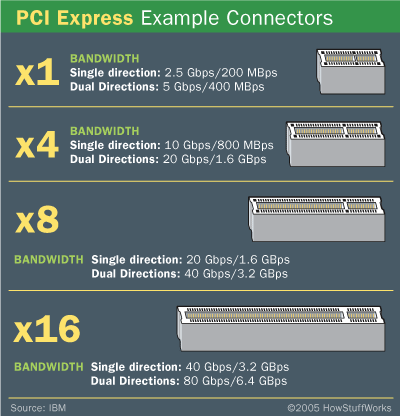
PCI Express uses an entirely different architecture, different slot sizes, and is incompatible with with PCI or PCI-X. It’s expected to coexist with PCI-X and not replace it.
 Linux Tidbits
Thanks for an excellent, short and useful post.
Excellent reference document… but one topic wasn’t covered and I am about to experiment and am wondering before I do…
Can an older dual voltage 64-bit PCI card (In this case a scsi controller) fit/function at 64-bit speeds in a PCI-X slot?
.. Will it work at all?
Asking before I order some parts and try it.
Thanks…
hello, Deliman31 the answer to your question is Definitely. PCI-X is designed to be fully backward-compatible with existing PCI architecture. I did mention this:
“…fully backward compatible though with the existing PCI architecture…”
Long as you know it is universal, you’ll be just fine.
My thanks for a short, clear review with great diagrams! I think your diagrams make your review the best I’ve seen on this topic.
Thank you.
This IS a good and thorough read….thx. My new wireless 2.3 universal card fits well into my “older” AMD mobo server (32bit @5v). OS (XP) doesn’t find it, force the latest drivers, and I get a code 10 flame out. I was very concerned about compatibility and because of YOUR research, I’m not. I think I have a DOA. :( Thanks again.
Follow-up
I don’t give up very easily…….I installed this particular universal PCI card into a vintage Intel box and like maic it works flawlessly. Both AMD & Intel machines are the same age. And I have run into this little quirk before with AMD. So there you have it. Thought I’d share this. ;) Thanks
Good news, crownline, glad it worked for you.
A bit more detailed question:
You stated:
“…fully backward compatible though with the existing PCI architecture
33/66 MHz PCI adapters (cards) can be used in PCI-X slots and PCI-X adapters can be used in PCI slots.…” and that the “…PCI-X or PCI eXtended was built mainly for high end use. It has a bus speed of 66 or 133 MHz and only used the 64 bit 3.3v slot…”
How does a 33MHz PCI card operate in a PCI-X slot that has a minimum bus speed of 66MHz?
Thanks,
CMcL
Even lower bus speed-cards work just fine in higher speed buses. You might want to get a better PCI card though as the bus speed will be lowered for all devices to be compatible with the lower-frequency card.
Quote:
“The rule of thumb for PCI and PCI-X cards is that if it fits in the slot, it’ll work.”
I have seen both PCI & PCI-X versions of an Sil3124 SATA controller card offered by the same manufacturer. If PCI-X cards are backward compatible with 32 bit PCI slots then why should a PCI card be available in addition to a PCI-X version?
Is it practical to fit a PCI-X card fit into a 32 bit PCI slot? The PCI-X card is longer so the section of the card beyond the second notch will not fit into the PCI slot. The contacts on this part of the card must therefore be left exposed since these are outside the PCI slot. Is this an issue?
Thanks for a very informative article.
Following on from the point I made about the available PCI-X and PCI versions of the same Sil3124 SATA controller:
If either of these controllers can be fitted into a 32bit slot would one offer any advantage over the other? More directly, which one should I buy to be fitted into a 32bit slot?
Thanks in advance.
Here’s a nice link which answers my questions.
http://episteme.arstechnica.com/eve/forums/a/tpc/f/24609792/m/618003695831
It corroborates that: “The rule of thumb for PCI and PCI-X cards is that if it fits in the slot, it’ll work.”
As for the exposed contacts on the part of the PCI-X card that protrudes outside the PCI slot, it seems that just a little personal ingenuity is called for.
> Is it practical to fit a PCI-X card fit into a 32 bit PCI slot? The PCI-X card is longer so the section of the card beyond the second notch will not fit into the PCI slot. The contacts on this part of the card must therefore be left exposed since these are outside the PCI slot. Is this an issue?
This is by design and yes many PCI-X cards will have extra pins that will not plug into the PCI slot. As for exposed pins this is usually not a problem unless you are in a humid place and leave them exposed for a long time. I’ve heard of people covering these pins, but it usually isn’t necessary.
> If either of these controllers can be fitted into a 32bit slot would one offer any advantage over the other? More directly, which one should I buy to be fitted into a 32bit slot?
Well, the PCI-X will likely have a great bus speed that will enable faster transfers if the bus supports it. If the price is equivocal go with the PCI-X card.
Thanks for link, I’ll be sure to read it.
Good and not too long, but it doesn’t cover PCI Express 2.0 or mention the upcoming (2011) PCI Express 3.0 standard…
Well, maybe someday I’ll add it. Have yet to come across either of these yet. But I agree that it needs to be covered.
hi, I have a server xseries 336, and I want to buy an ethernet card on ebay, but I am not sure of which one, can you help me???
xseries 336, type 8837 has two PCI slots (assuming you didn’t pay for the PCI-e option for slot 2). Slot 2 is full running 133Mhz, 64bit, 3.3v ONLY.
Slot 1 is 64bit, low profile, 3.3v ONLY and is limited to 100Mhz.
(source ibm Hardware Maint. Manual doc for 8837, and 1879 and forum question)
I have IBM Xseries 336 type 8837, and I bought a video card that has PCI Express 16 , I didn’t know that I can’t fit the the video card since its pci express 16.. is there a way where I can use a converter or a riser to make it take the new card?